Elsewhere
Release TIL Research Tool Museum Sighting Comment
Filters: Sorted by date
I'm working towards a new LLM release, and testing PRs caused me to revisit the llm-echo debug plugin. This plugin provides a "model" which doesn't involve an LLM at all - it just repeats back the prompts that have been fed to it. The new release now updates the simulated token usage counts to take tool calls, system prompts, and reasoning tokens into account.
Example usage:
uvx --with llm-echo llm -m echo 'hi there' -o thinking 1 --usage
Outputs:
First I consider the prompt, then I decide what to say.
{
  "prompt": "hi there",
  "system": "",
  "attachments": [],
  "stream": true,
  "previous": []
}
Token usage: 2 input, 24 output


web-edit (previously) is my tiny web app for browsing and editing files in a folder. I mainly built it for editing files on different machines via Tailscale.
I added a "copy to clipboard" option for both text and image data. I needed this because I was running pelican prompts on a laptop from my phone (here's DeepSeek 4.1 Flash 1017) and I wanted an easy way to copy the resulting logs into a Gist.
Another game experiment - I wanted to see if it was feasible to have a two player game on two separate phones running in static HTML where the networking code uses chirps sent via the microphone. It seems to work!
Build a two player competitive pong like game where two players use their phones close to each other and the game state is sent via audio noises which the web microphone API can interpret - but add graphical and gameplay twists to make it a lot more fun and intertwine than pong
Claude Opus 5.5 Extra in Claude Code.
Inspired by Paul Ford and Aboard Foundary's new web app Tiny Little Office, which provides a suite of web app content editors (a Word Processor, Outliner, Presentation Builder, Spreadsheet, Calculator, Drawing Tool, Diagram Maker, Animator, Calendar, and Trip Planner).
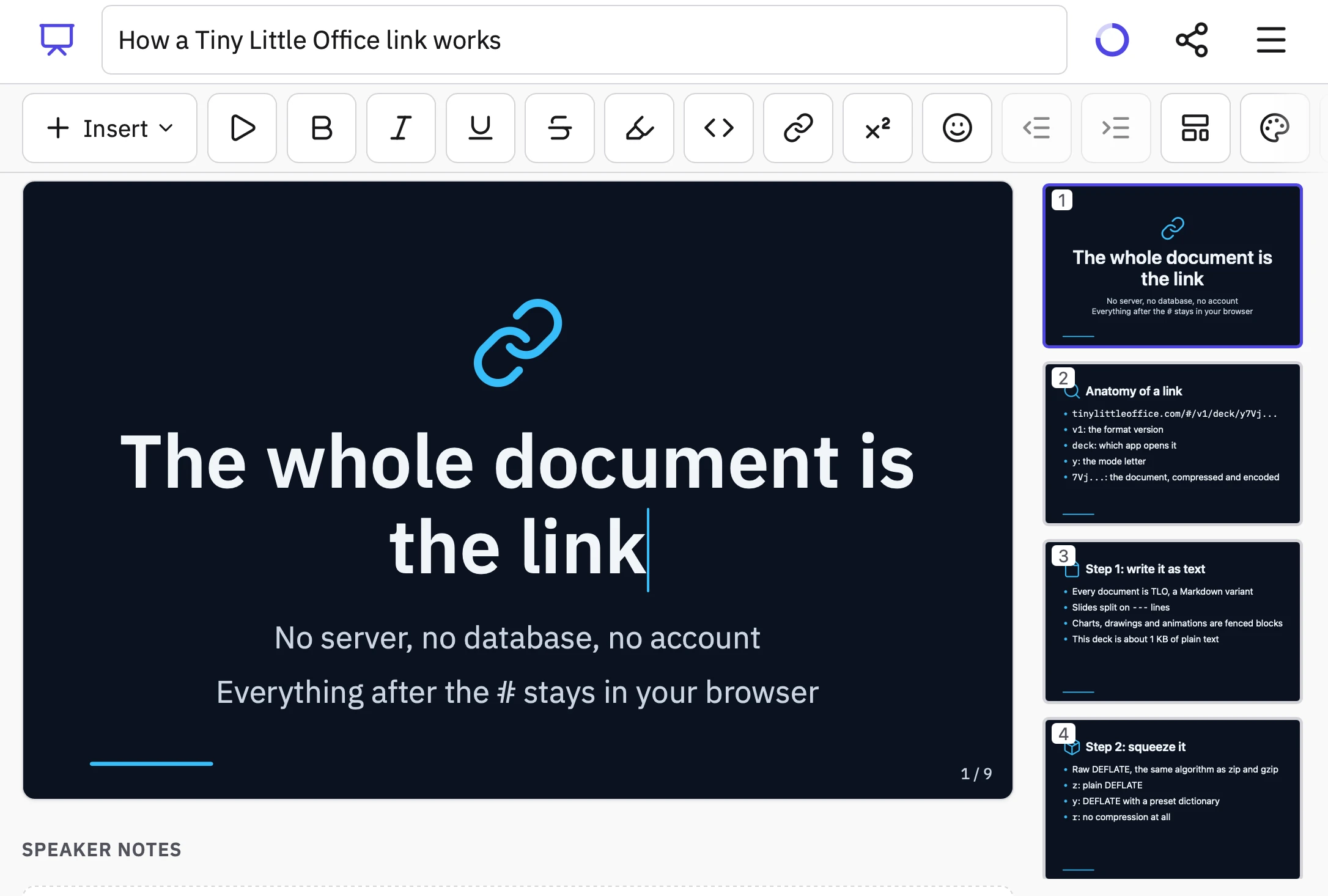
Tiny Little Office's signature trick is to store all of the document data in the #fragment section of the URL, so every document created using it becomes a bookmarkable and shareable link.
It also has an llms.txt file telling agents how to construct URLs that will render as documents. Claude used that file to generate this link to a deck that explains how the URL format works:
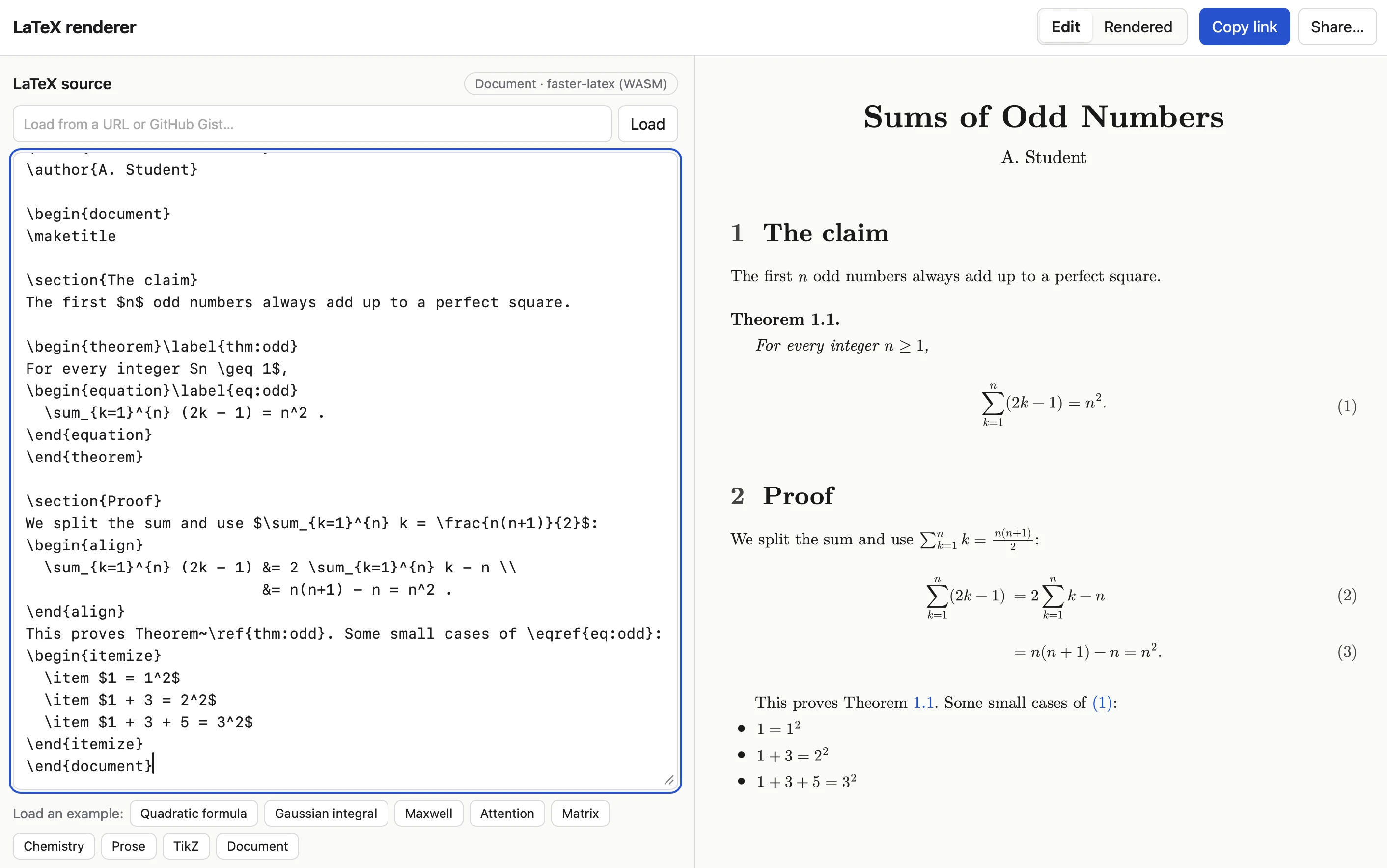
Tiny Little Office inspired me to have Claude Code (Opus 5.5 Extra) build a similar tool that works with LaTeX. Here's the sequence of prompts I used:
I want a tool where you can link to it with a fragment hash #code-here and it treats that code as LaTeX and renders it really effectively. It should also support a prefix which means the latex is compressed with a custom compression dictionary optimized for latex. Use the best available latex render library from a CDN (consider WebAssembly too). If loaded without a fragment hash show an editor you can paste latex into and then toggle to a "rendered" view. That rendered view should be bookmarkable. The #fragment view should let you switch to edit source too.
Since it was working in my tools repo I told it to take inspiration from the <iframe sandbox="..."> mechanism used by my existing SVG in Markdown tool as protection against XSS risks:
Safe from XSS? We could run in an iframe sandbox like we do on the SVG markdown render project
I had it copy the Gist/URL loading feature from that tool as well:
We should have an option to load latex from a URL (or gist) similar to the markdown SVG tool
Here's an example link. The tool uses Pako 2.1.0, MathJax 4.1.3, faster-latex 0.3.1, and DOMPurify 3.4.16.
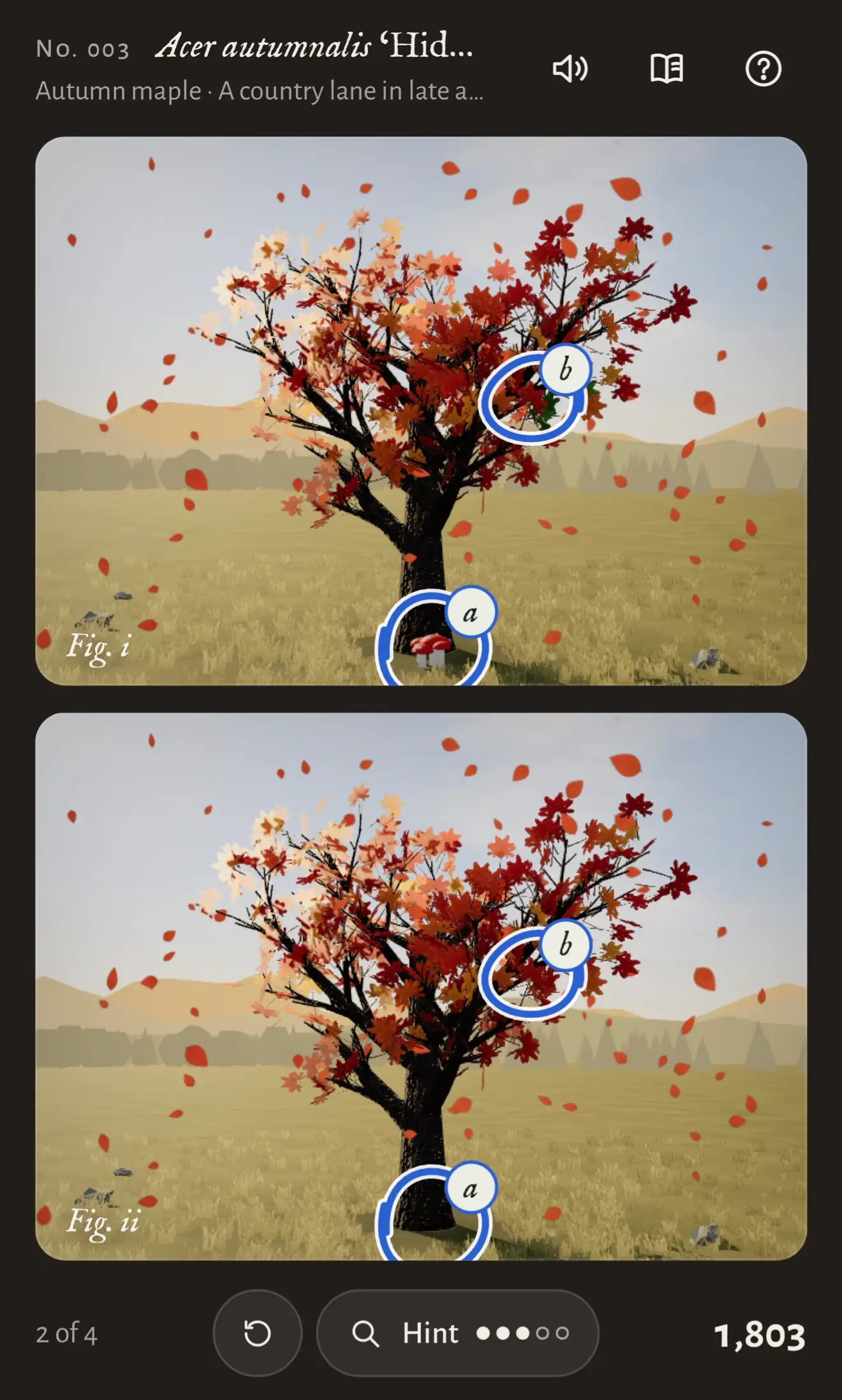
Another game experiment with Claude. This one used the default Claude iPhone app (chat mode, not Claude Code mode), where I prompted Claude Opus 5.5 Max with:
Build a three js game called "Tree appreciator" - it shows you two algorithmically generated trees and the game mechanics is about appreciating the differences between them. Think hard about how to make sure it is both fun and beautiful.
Somewhat embarrassingly given my recent talk, I've found that telling Opus 5.5 "make sure it is fun" works uncomfortably well. In this case Claude crunched for 3 hours and 7 minutes before retuning a cosy little spot-the-difference game with music and animation and achievements that's quite compelling to play.
I added support to llm-gemini for the new Gemini 4 Argon model, made available today via the Gemini API and for customers of their $100/month subscription plan.
Here are the low, medium and high pelicans. As expected, they are all excellent: Gemini has a track record of producing great SVGs, and are the only lab where I know their staff have invested in SVG specifically (and who have boasted about their pelicans before.)
Here's the "high" illustration, which cost me 17.166 cents:

The pricing is interesting. At launch, Argon is $2/million input and $10/million output - the same price as GPT-6 Sol, half the price of Claude Opus 5.5 and 1/5th the price of Claude Fable 5.1 and GPT-6 Astra.
But on December 1st Argon is set to double in price - so it will be the same price as Opus 5.5.
Prices like this aren't really comparable these days since what really matters is how many tokens a model takes to achieve a goal within an agentic harness.
One useful clue for that comes from Artificial Analysis, who publish the total cost to run their benchmark using each model. Argon is looking very good there - costing $2,407 to run the benchmark, putting it close to GLM-5.3 and significantly cheaper than OpenAI, Anthropic, and Meta's latest models.
When the price doubles it will still be a little cheaper than GPT-6 Astra.
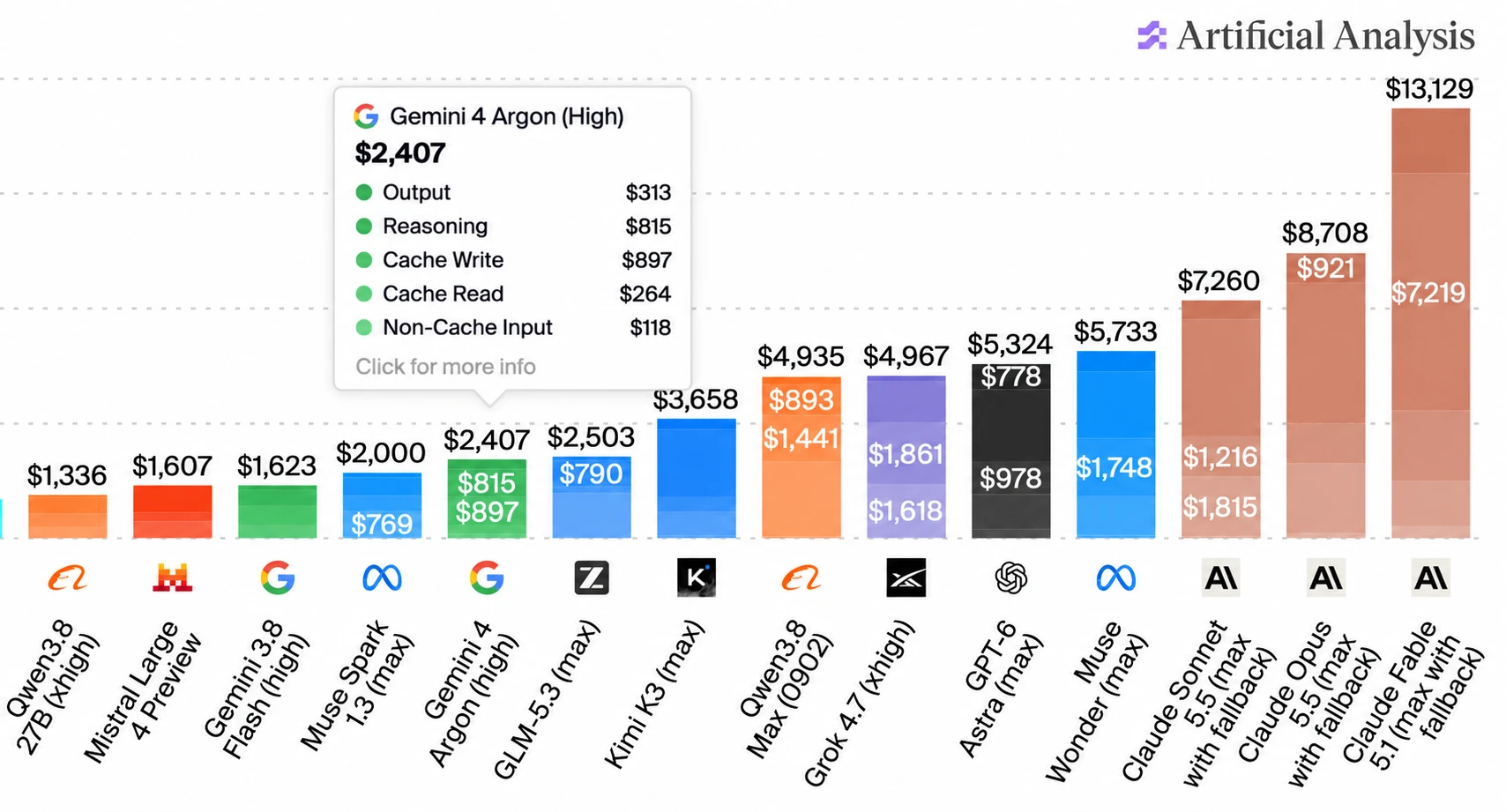
(I used ChatGPT to edit that chart! The data is all correct, I checked - I needed to get that Gemini 4 Argon info box to display without overlapping the other numbers.)
Some bonus examples using Gemini 4 Argon: here's Generate an SVG of an armadillo in fishnet tights jaywalking on Mars, here's a Fabergé egg it created for me using Blender, and DeepMind staffer @fofrAI shared a video of a pelican riding a bike, using fourier epicycles. That's a fun new twist!
Includes performance optimizations written by Claude Opus 5.5 after I fed it this Python 3.15 profiling report generated by GPT-6 Astra.
Meta AI release Muse Wonder (and Muse Wonder Full), their new "most capable models". These look like they may be Meta's first Fable class models - Artificial Analysis scores Muse Wonder (Max) as equivalent to GPT-6.1 Sol.
I updated my llm-meta-ai plugin for the new model. Here are pelicans for Muse Wonder for the six reasoning levels: minimal, low, medium, high, xhigh, max. This is the max one:

For comparison, here are pelicans for Muse 1.3 (released September 2nd) and Muse 1.2 (released August 5th). Meta AI are putting out a new model a month, and the improvements between each model (at least in terms of drawing pelicans) are material.


I put the new Python 3.15 profiler through its paces by having GPT-6 Astra Extra High in Codex run it against my new web-edit app:
I need a Python 3.15 flame graph and heatmap demo of the "web-edit" app from PyPI - research first then make me those demos
Here's the resulting example flame graph and heatmap.
I was working on a project from my phone using Codex Remote when I found myself wanting to edit a credentials file without round-tripping those credentials through the LLM itself.
So... I had Codex and GPT-6 Astra Extra High build this Python web app which provides a web UI for viewing and editing files in a folder. It's intended to be run over Tailscale, so I can have an agent start this running and then edit files via my Tailscale network directly from my phone.
Here's the interface for browsing files in a folder:
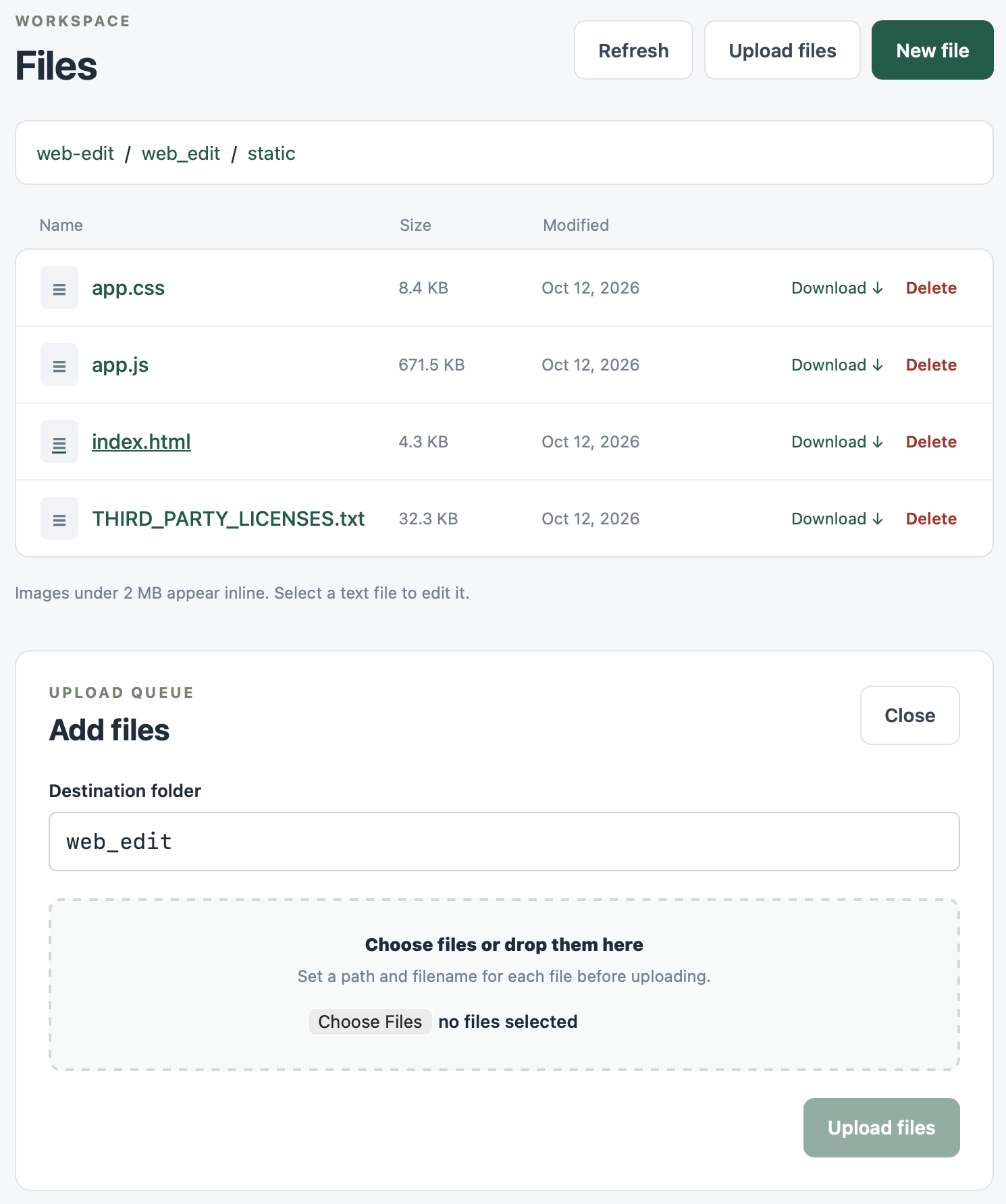
Editing uses CodeMirror 6 - I was going to use Monaco but that still doesn't have a great mobile experience yet.
My plugin for detecting and listing all Datasette instances on the current machine now works with the latest version, and displays the detected PID as well. Knowing the PID makes it easier to attach the new Python 3.15 profiler.


I released ttok 0.4, ran uv tool upgrade ttok, piped a file into the new version... and realized that it was defaulting to the GPT-4 tokenizer when it should very clearly default to GPT-5/GPT-6 instead!
I figured switching the default was a reasonable excuse to finally ship a 1.0.
OpenAI haven't actually confirmed that GPT-6 uses the same tokenizer as the GPT-5 family yet - there's an angry issue about it - but I found this commit by William Liu which reports on an experiment he ran confirming that the tokenizers are likely the same:
All seven GPT models (5.5, 5.6 Sol/Terra/Luna, 6 Astra/Sol/Luna) report 44,794 tokens and match each other on every one of the 31 fixtures. GPT-6 introduces no input-count change on this corpus.
ttok is my CLI tool for counting tokens, using OpenAI's open source tiktoken library.
It hasn't been in updated in a couple of years, but I finally fixed a Click warning, updated CI, and added a --list-models command to list available models.
It works with uvx, so you can count tokens in anything like this:
cat file.txt | uvx ttok


OpenAI released their new Jev-style Decisions API, as previously announced at last week's DevDay.
Since I already have an llm-typesafe plugin for talking to Jev, I had GPT-6 Astra read the new OpenAI API documentation and build an llm-openai-decisions plugin inspired by llm-typesafe.
Unlike Jev, the new gpt-6-luna decision model supports image input in addition to text. Both models charge for input it and not for output: OpenAI's is 10 cents per million input tokens, Jev's is 4.2 cents per million.
Otherwise the API shape is very similar to Jev, at least conceptually. Jev supports three question types for yes/no, choices, or scores. OpenAI Decisions supports the same three types.
Install the plugin like this:
llm install llm-openai-decisions
Here's an example query against an image attachment:
llm -m openai-decisions/gpt-6-luna \
  -a https://static.simonwillison.net/static/2025/two-pelicans.jpg \
  -s 'Does this image contain any mammals?'
And example output:
{"type": "predicate", "name": "evaluation", "probability": 0.0}Consult the README for full details of how to run the other types of questions.
Adds support for reasoning models, such as the newly released Mistral Large 4.
I saw Parseable in a Show HN today - it's a new observability platform with both an open source (AGPL) Rust implementation (a single ~180MB binary), an "Enterprise" version with extra features and a cloud hosted option.
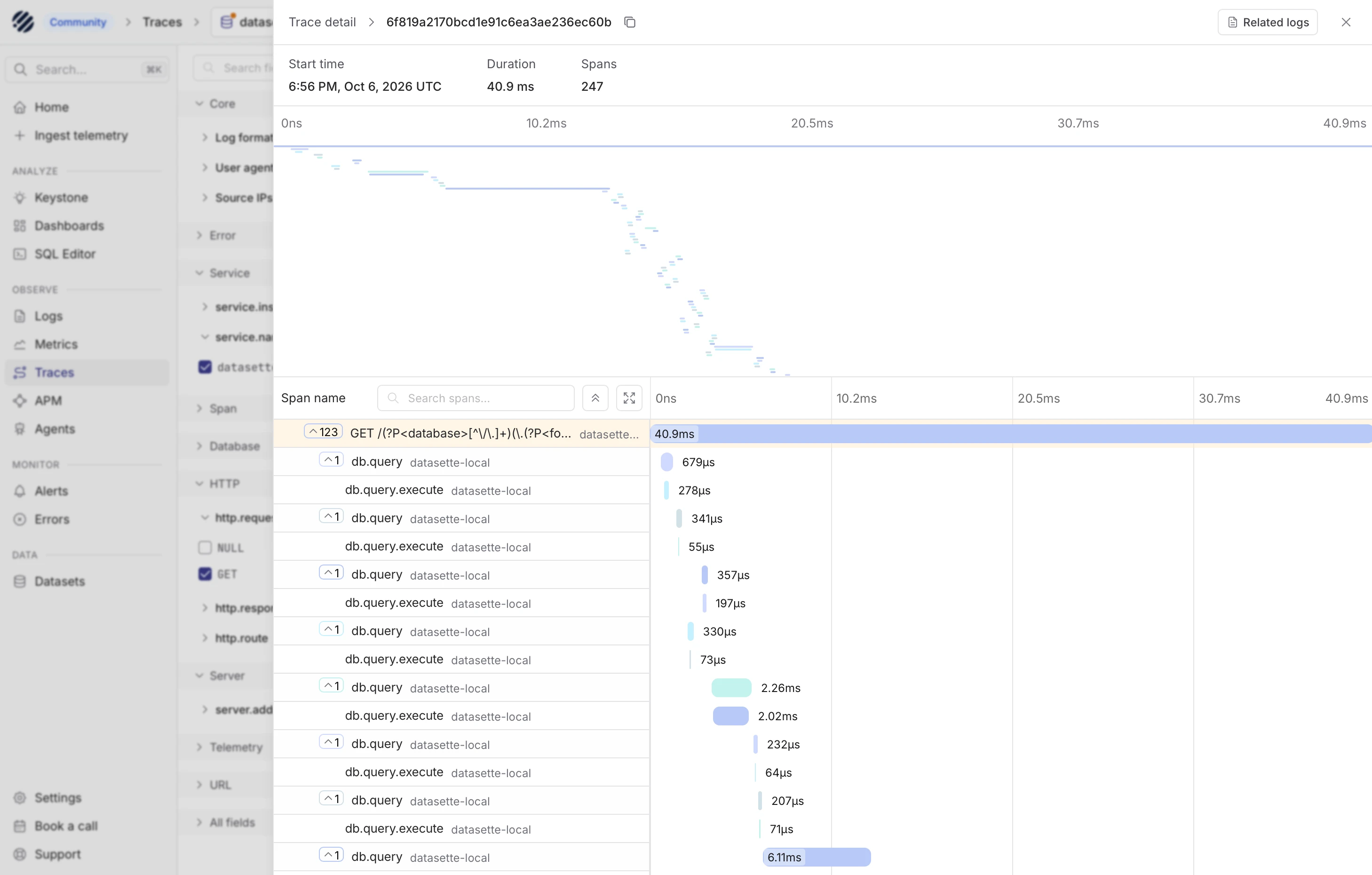
Since Datasette 1.0a41 added OpenTelemetry support (thanks, Alex Garcia), I decided to fire up Codex and have it figure out how to run Parseable and feed it traces from Datasette.
Here's my (human-written) TIL showing the patterns that worked, and here's a screenshot of a Datasette trace displayed within the Parseable localhost web application:
Comment My comment on Mistral Large 4 — Hacker News
wren6991: The benchmark is saturated. Frontier models are tested with an armadillo in fishnet tights jaywalking on Mars.
OK well I couldn't resist this one:
llm -m claude-opus-5.5 'Generate an SVG of an armadillo in fishnet tights jaywalking on Mars'
llm -m gpt-6.1-sol 'Generate an SVG of an armadillo in fishnet tights jaywalking on Mars'
llm -m gemini-3.8-flash 'Generate an SVG of an armadillo in fishnet tights jaywalking on Mars'
llm -m mistral/mistral-large-4 'Generate an SVG of an armadillo in fishnet tights jaywalking on Mars'
Default reasoning levels for each: https://tools.simonwillison.net/markdown-svg-renderer?url=ht...
A minor fix for compatibility with the latest Datasette alphas. This meant we could upgrade the datasette.io site to Datasette 1.0a41.
I wanted to see if Claude Opus 5.5 could compose music, so I tried this:
I want you to write some computer game music for me. First design simple text based format for the music and build an artifact that can play it out loud - include some example tracks in that artifact
I am looking for music of the quality of the original secret of Monkey Island
It leaned a lot harder into the Monkey Island theme than I had intended, but the results are surprisingly good.
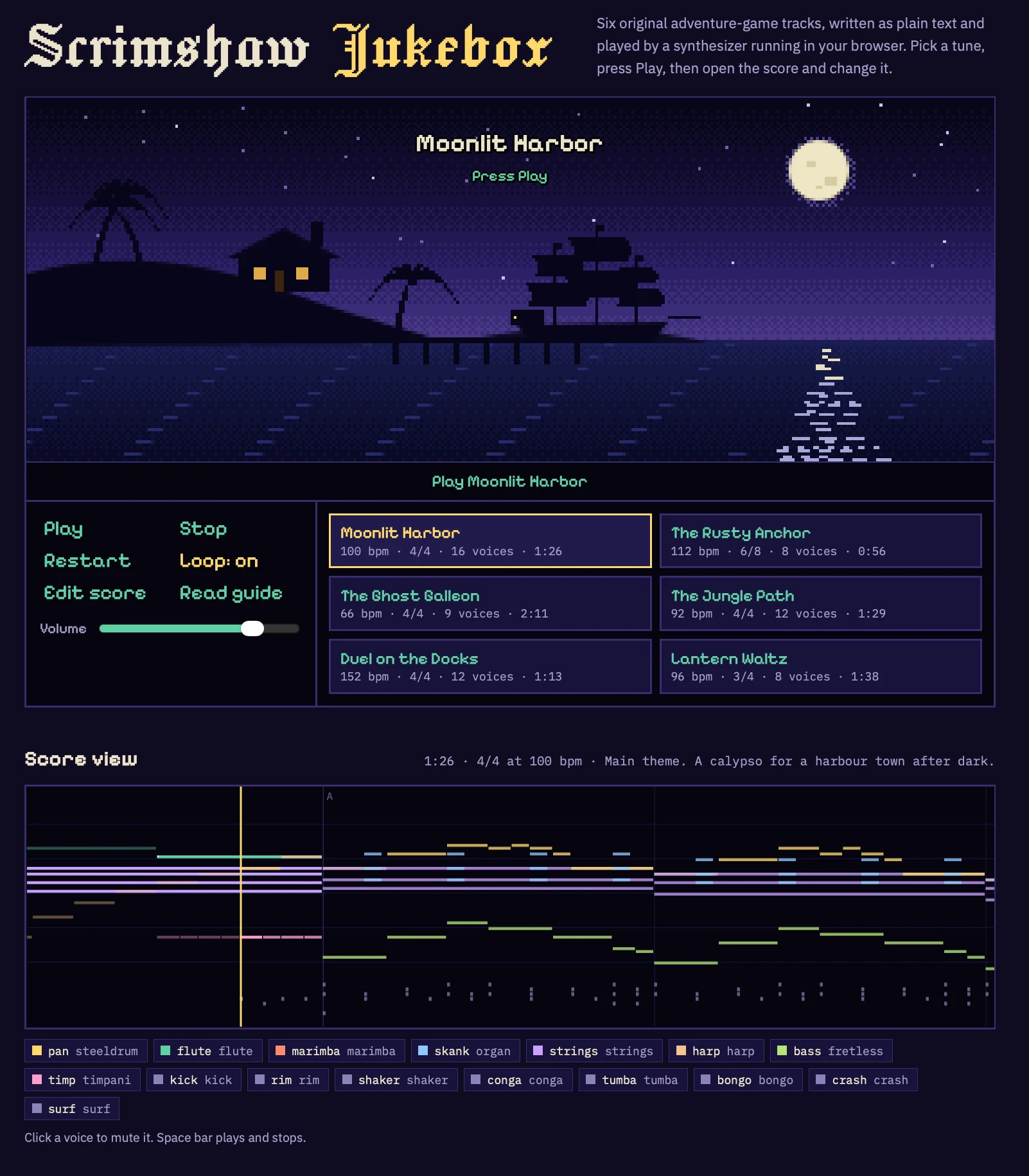
I wonder if the ability to compose competent music is similar to the 3D graphics thing - a new capability for text models that emerged in the past few months?
Would need some careful experiments with other recent and not-so-recent models to confirm if this is new or if they've been able to do this for a while.


Colin Frasier posted on Bluesky about an experiment he ran over two years ago using GPT-4o to see how well it could "compute the sum but return the answer in words" across increasingly large numbers. Here's the chart he shared of those results:
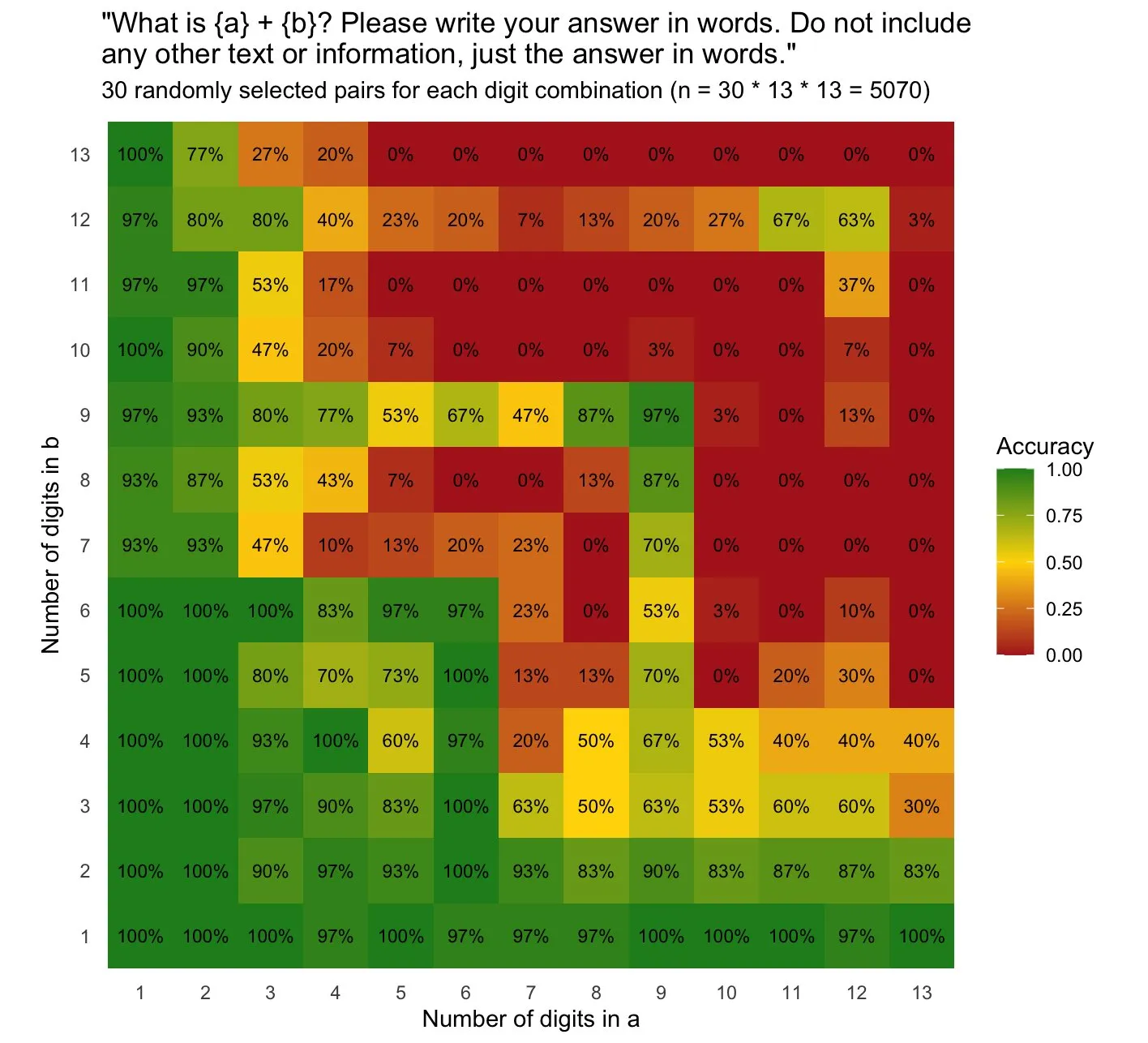
I'm confident GPT-4o didn't cheat and use a calculator, especially since it got so many of the calculations wrong, but I was inspired to run the experiment again on local hardware (a DGX Spark) to explore the effect in a fully controlled environment.
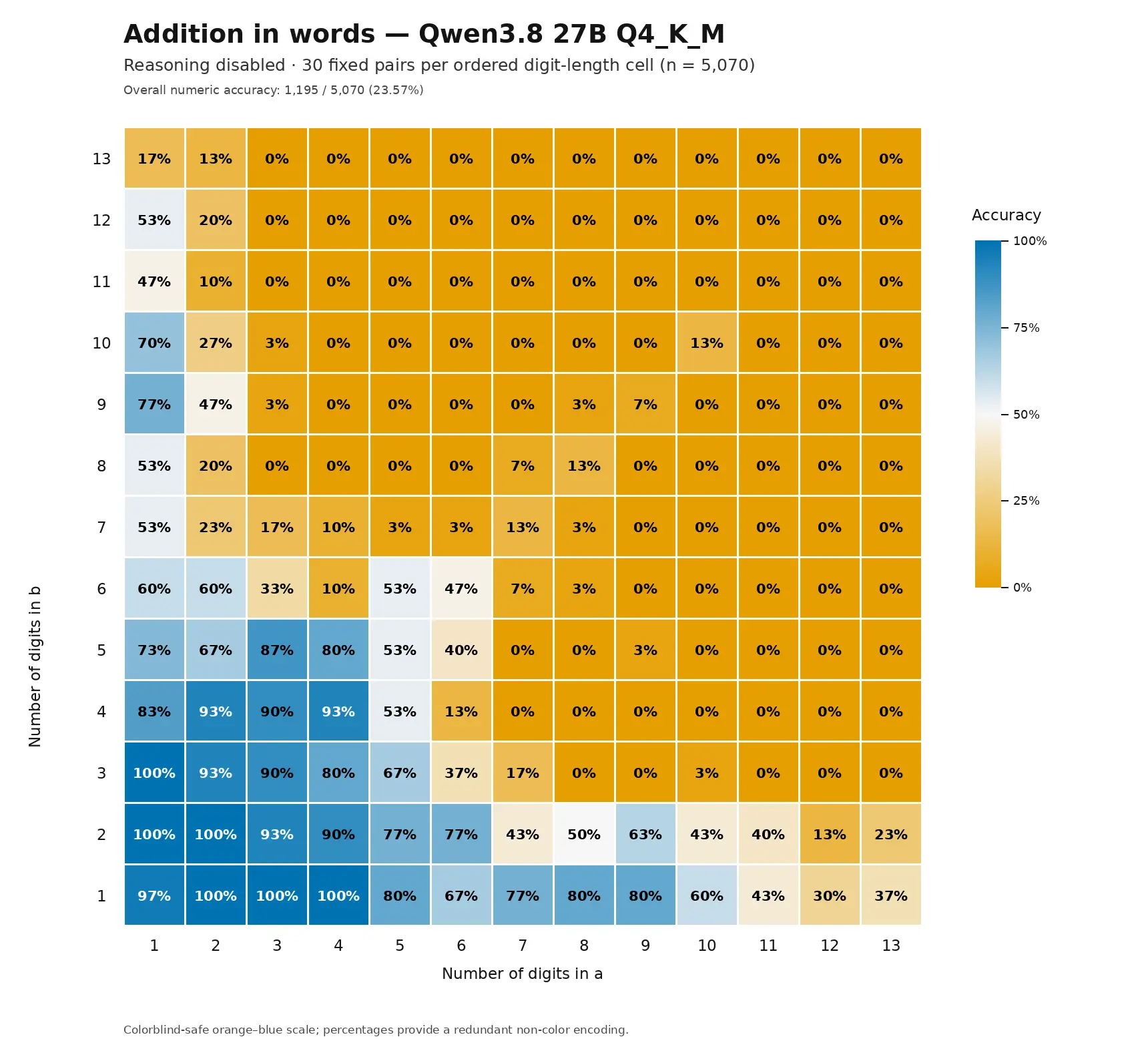
I pasted his image into a Codex Remote session (GPT-6 Astra) and had it run the same experiment using Qwen3.8-27B-Q4_K_M.gguf. Here's the result for a run of 30 attempts per combination with reasoning disabled:
Then I ran it again with reasoning enabled. This took a lot longer per pair, so instead of running 30 samples per square I ran just one - which results in a much less visually appealing heatmap since each square is either 100% or 0%:
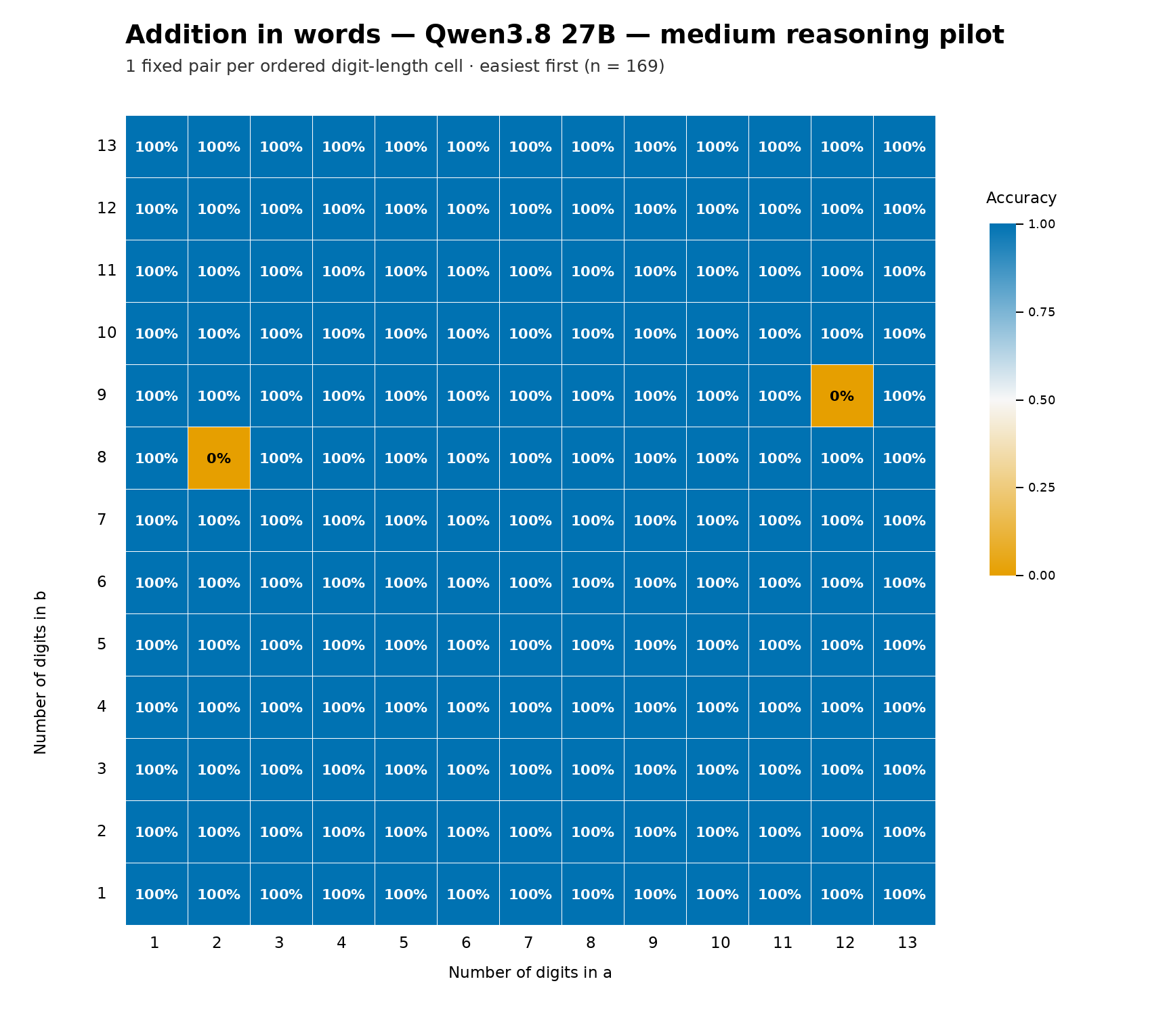
It got the right answer in 167 out of 169 attempts, and since these were one-shot I'm confident a second run would produce different results here.
Here's a version of the report that includes the reasoning traces from some of those larger calculations, which include text like this:
Wait, let me redo this more carefully.

4,299,366,105,622
6,088,794,067,970

Let me align them:
4 2 9 9 3 6 6 1 0 5 6 2 2
6 0 8 8 7 9 4 0 6 7 9 7 0

Adding from right to left:
Position 1 (units): 2 + 0 = 2
Position 2 (tens): 2 + 7 = 9
Position 3 (hundreds): 6 + 9 = 15, write 5, carry 1



Located just before the turnstiles in the Grand Army Plaza subway station at the north end of Brooklyn's Prospect Park is this former newsstand which is now operated by a dinosaur.
The density of dinosaur puns is exceptional.
Comment My comment on EmbeddingGemma 2 — Hacker News
I really appreciate that EmbeddingGemma 2 is under the Apache 2.0 license.
For embedding models in particular, I don't think it makes sense to use a closed, proprietary, hosted-only model.
Most applications of embedding models involve calculating thousands or even millions of embedding vectors and storing them for later comparison.
If your model is proprietary, the vendor is likely someday going to decide to stop offering that model. They'll have a better model to replace it, but you still need to pay to re-calculate those millions of stored existing vectors.
(In April 2024 OpenAI offered to "cover the financial cost of users re-embedding content with these new models" - https://openai.com/index/gpt-4-api-general-availability/ - but I don't think that's something we can rely on from every provider.)
Notably, I don't want to host the model myself. I'd much rather pay a provider for a hosted model while knowing that if they ever stop hosting it I can run the open weights version myself - or find another vendor who can do that for me.
# 6th October 2026, 8:37 pm / google, ai, generative-ai, embeddings, gemma